Bringing 3D Bat Laser Cut SVG Designs to Life for Halloween and Beyond
There is a specific kind of satisfaction that comes from watching a laser cutter trace a precise path across a sheet of wood or acrylic, but the real magic happens when you move beyond flat, two-dimensional shapes. This is where the concept of a 3D Bat Laser Cut SVG becomes a game-changer for makers and small business owners alike. Unlike standard silhouette files that result in a single flat piece, these specialized designs are engineered with interlocking slots, layering guides, and assembly instructions built directly into the vector paths. When you download a package containing these files, you aren't just getting an image; you are acquiring a blueprint for a physical object that stands out—literally—from the surface it rests on.
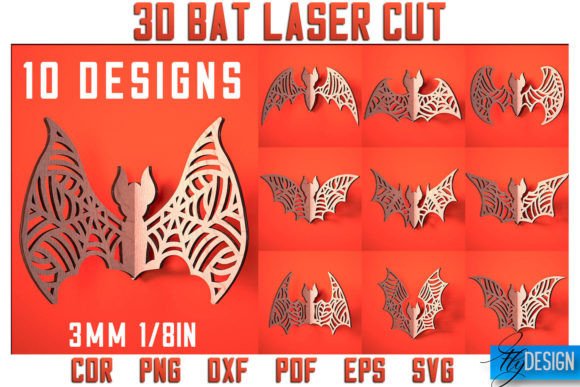
The appeal of these designs lies in their versatility. Whether you are a hobbyist looking to decorate your home for the spooky season or an entrepreneur running an Etsy shop focused on seasonal decor, the utility of a well-constructed bat design cannot be overstated. The files typically come in a comprehensive archive, often including ten SVG files, ten EPS files, along with PNG, PDF, and DXF formats. This variety ensures compatibility regardless of whether you are using LightBurn, Illustrator, CorelDraw, or the proprietary software that came with your desktop cutter. Having access to multiple file types means you spend less time converting formats and more time creating.
Understanding the Mechanics of Layered Design
When you open one of these 3D Bat Laser Cut SVG files, you will notice distinct line colors, usually red and black. This is not an artistic choice but a functional instruction set. In the world of laser cutting, red lines typically indicate cut paths, telling the machine to burn all the way through the material to separate the piece. Black lines, conversely, signify engraving, where the laser marks the surface without cutting through. This distinction is crucial for assembling 3D models. The engraved lines might show you where to fold, where pieces interlock, or simply add texture and detail to the bat's wings and face.
Before sending any file to your machine, it is vital to verify that your software interprets these color codes correctly. Different machines have different default settings, and a mismatch could result in a bat that is fully cut apart with no structural integrity or, worse, a solid block with no separation at all. Taking a few minutes to preview the job in your software saves material and frustration. Once you confirm the settings, the process transforms digital vectors into tangible art. The result is a bat that can stand on a shelf, hang from a ceiling with added depth, or serve as a dynamic wall hanging that casts interesting shadows when lit.
Real-World Applications for Creators and Businesses
The use cases for these designs extend far beyond a simple Halloween decoration on a mantelpiece. For small business owners, particularly those selling handmade goods, offering 3D elements can significantly increase the perceived value of a product. A flat wooden bat might sell for a few dollars, but a multi-layered, assembled 3D bat demonstrates craftsmanship and effort, allowing for a higher price point. You can create sets of varying sizes, paint them in metallic finishes, or leave them natural for a rustic look. These items are perfect for autumn craft fairs, holiday markets, or as add-on items for customers buying larger custom signs.
Educators and workshop leaders also find immense value in these files. Teaching a class on laser cutting basics can be challenging if the projects are too abstract. A 3D bat project offers a clear, engaging goal. Students learn about kerf compensation—the width of the laser beam that removes material—because if the slots are not designed with kerf in mind, the pieces won't fit together. They learn about material grain direction, assembly logic, and the difference between vector cutting and raster engraving. By the end of the session, they walk away with a cool, functional object rather than a pile of scrap wood.
Event planners and party decorators utilize these designs to create immersive environments. Imagine a hallway lined with dozens of these bats, arranged in a swarm formation on the wall. Because they are 3D, they catch the light differently than flat decals, creating a dynamic visual effect that enhances the atmosphere of a haunted house or a themed corporate event. Furthermore, because the files are digital, you can scale them up or down instantly to fit specific spaces, something impossible with pre-manufactured plastic decorations.
Material Considerations and Best Practices
While the digital file provides the roadmap, the material you choose dictates the final aesthetic. Plywood, specifically birch or bamboo, is a popular choice for these 3D Bat Laser Cut SVG projects due to its strength and clean edge quality. It holds fine details well, which is essential for the intricate wing veins often found in high-quality designs. Acrylic is another excellent option, especially if you want a modern, sleek look or plan to backlight the design. When using acrylic, the engraved black lines can create a frosted effect that contrasts beautifully with the glossy cut edges.
However, users must be mindful of material thickness. Most 3D designs are optimized for specific material widths, commonly 3mm or 1/8 inch. If you attempt to use thicker stock without adjusting the slot widths in the design software, the pieces will not slide together. Conversely, using material that is too thin will result in a wobbly structure. This is why having access to the source files in editable formats like EPS or DXF is so beneficial; it allows experienced users to tweak slot dimensions to match the exact caliper measurement of their chosen material.
Safety is another practical consideration. When cutting materials like MDF or certain plastics, ensure proper ventilation. The burning of adhesives in plywood or the melting of acrylic can release fumes that are harmful if inhaled over long periods. Always operate your machine in a well-ventilated area or with an appropriate filtration system. Additionally, keep a close eye on the cutting process, especially during the initial test runs of a new design, to ensure that the flame does not flare up, which can ruin the delicate edges of the bat wings.
Maximizing Your Digital Purchase
When you invest in a digital bundle containing ten SVG, EPS, PNG, PDF, and DXF files, you are buying flexibility. You might start by making a single bat for your own porch, but soon realize that the same files can be used to create matching coasters, keychains, or even jewelry if scaled down appropriately. The inclusion of PNG files is particularly helpful for those who might want to use the image for digital marketing, social media posts, or sublimation printing on t-shirts, expanding the utility of the purchase beyond the laser cutter.
It is also worth noting that communication with the creator can enhance your experience. If you require a specific file type not listed, or perhaps a PNG with a transparent background in a different resolution, many designers are willing to accommodate requests. This level of support is invaluable for professionals working on tight deadlines with specific client requirements. Following the shop or creator ensures you stay updated on future releases, which might include complementary designs like pumpkins, ghosts, or spiderwebs that coordinate perfectly with your bat collection.
Ultimately, the transition from a screen to a physical object is what makes laser cutting so rewarding. A 3D Bat Laser Cut SVG is more than just a file; it is a tool for creativity that bridges the gap between digital design and tactile reality. Whether you are refining your skills, building a product line, or simply enjoying the process of making something unique with your own hands, these designs offer a reliable and versatile foundation. By understanding the file structure, choosing the right materials, and applying these designs in thoughtful ways, you can create stunning results that resonate with audiences and bring a touch of three-dimensional wonder to any project.