Bear in Alaska 3D Shadow Box SVG Guide
There is a distinct quiet power in the imagery of the Alaskan wilderness, specifically the solitary figure of a bear navigating its natural terrain. Capturing that depth and atmosphere in a flat medium has always been a challenge for crafters and designers alike. This is where the Bear in Alaska 3D Shadow Box SVG changes the game. It is not merely a digital file; it is a blueprint for creating an immersive, tactile experience that brings the raw beauty of the north into any interior space. Whether you are a seasoned paper artist, a small business owner looking for unique inventory, or a hobbyist seeking a rewarding weekend project, this layered design offers a sophisticated way to explore dimensionality without needing industrial equipment.
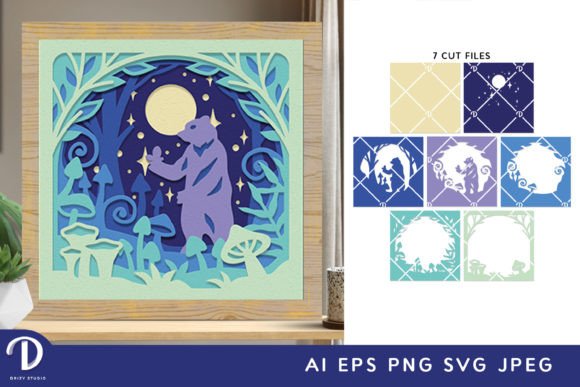
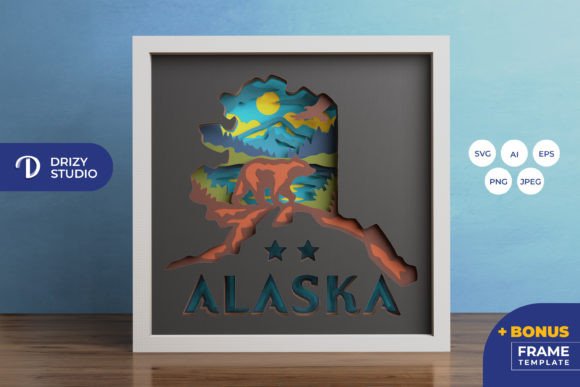
At its core, this product is a meticulously engineered paper-cutting template. It transforms a standard square format into a window looking out onto a wild landscape. The design relies on the interplay of light and shadow across eight distinct layers to create a convincing illusion of depth. When assembled, the foreground elements appear to reach out toward the viewer, while the background recedes, mimicking the vast distances found in actual Alaskan vistas. The inclusion of the Bear in Alaska 3D Shadow Box motif ensures the piece has a strong focal point, grounding the composition in wildlife realism rather than abstract geometry.
Technical Precision and File Versatility
One of the most immediate benefits of this template is its technical robustness. You receive the design in a comprehensive suite of formats: AI, EPS, PNG, SVG, and JPEG. This variety is crucial because it acknowledges that creators work in different ecosystems. If you are using Adobe Illustrator for professional scaling, the AI and EPS files (sized at 714 x 714 px) provide vector precision that ensures clean lines regardless of output size. For those relying on browser-based tools or specific cutting software, the SVG format is the industry standard for compatibility with machines like Silhouette and Cricut.
The file specifications are optimized for both digital manipulation and physical production. The base size is set to 20.32×20.32 cm (approximately 8 inches), which is a versatile dimension for framing. However, the SVG file allows for resizing, provided you maintain the aspect ratio to prevent distortion of the intricate details. The high-resolution JPEG preview (3000 x 2000 px) serves as an excellent reference for color planning or marketing materials if you intend to sell finished pieces. Having access to these multiple formats means you aren't locked into a single workflow; you can adapt the Alaska 3D Shadow Box design to fit your specific hardware and software constraints.
Crafting the Illusion of Depth
Creating a successful shadow box is less about cutting paper and more about understanding how light travels. This template features eight specific layers, each contributing to the final visual narrative. The front layers typically contain the finest details—perhaps foliage, rocks, or the defining contours of the bear itself—while the rear layers establish the atmospheric perspective of the mountains and sky.
When assembling the Bear in Alaska 3D Shadow Box SVG, the spacing between these layers is just as critical as the cut lines themselves. Using foam tape or doubled-up cardstock creates the necessary gap for shadows to form. If you place the layers too close together, the effect flattens; too far apart, and the structural integrity may suffer without a deep frame. The design accounts for this by separating elements logically, allowing you to experiment with spacer thickness to achieve everything from a subtle relief to a dramatic, tunnel-like depth.
For those without electronic cutting machines, the design remains accessible. The lines are clear enough to be traced and cut with a precision art knife and scissors, though this requires patience and a steady hand. The complexity of the bear's fur or the texture of the Alaskan terrain might challenge manual cutting, but the result offers a uniquely organic feel that machine cuts sometimes lack. Whether machined or manual, the end result is a piece of art that demands attention.
Practical Applications for Creators and Businesses
The utility of this template extends far beyond a single home decor project. For entrepreneurs and Etsy sellers, the Bear in Alaska 3D Shadow Box - Alaska 3D Shadow Box represents a viable product line. Handmade, layered paper art commands a higher price point than flat prints due to the labor and perceived value involved. You can produce these as ready-to-hang framed pieces, targeting customers who appreciate rustic, cabin-style, or nature-inspired aesthetics. Alternatively, you can sell the physical kits—pre-cut layers bundled with assembly instructions—for customers who enjoy the DIY process but lack the time to source materials.
Educators and workshop leaders can also leverage this design. It serves as an excellent teaching tool for concepts like foreground, middle ground, and background in visual arts classes. Building the shadow box demonstrates principles of engineering and spatial reasoning. In a corporate setting, these boxes make distinctive gifts or office decorations that convey a sense of adventure and stability, traits often associated with the bear symbol.
Furthermore, the design is adaptable for lighting installations. By adding an LED strip around the inner perimeter of a deep frame, you transform the static paper cut into a glowing lightbox. The light filters through the layers, casting dynamic shadows that change throughout the day as ambient light shifts. This turns the Alaska Shadow Box template into a functional lamp or nightlight, expanding its use case from wall art to functional decor.
Material Selection and Assembly Tips
To maximize the impact of the Bear in Alaska 3D Shadow Box SVG, material choice is paramount. Standard printer paper is rarely sufficient; it lacks the rigidity to hold its shape over eight layers and tends to warp with humidity. Instead, opt for cardstock ranging from 65lb to 80lb cover weight. This thickness provides enough body to stand up to the tension of layering while still being easy to cut.
Color theory plays a significant role here. While the template provides the shapes, you decide the palette. A monochromatic scheme using various shades of blue and grey can evoke a cold, misty morning in Alaska. Conversely, using warm ambers and deep greens can suggest a late summer sunset. Some artists choose to gradient the layers, darkening the rearmost layer to enhance the sense of distance. Remember that the edges of the cut paper will be visible from the side if not framed properly, so consider painting the edges or using colored cardstock that matches the face of the layer.
Assembly requires patience. Start from the back layer and work forward, ensuring each layer is perfectly aligned before pressing it down. Misalignment in the early stages compounds as you add layers, potentially obscuring key details of the bear or the landscape. Use tweezers for placing small, intricate pieces, and allow adhesive to set fully before moving to the next step. Double-sided foam tape is generally preferred over liquid glue, as it prevents warping and maintains consistent spacing.
Final Thoughts on Implementation
The Bear in Alaska 3D Shadow Box SVG is more than a digital download; it is an invitation to engage with art in a three-dimensional space. It bridges the gap between digital design convenience and the tangible satisfaction of handmade crafts. Whether you are framing it for your own living room, selling it as a premium decor item, or using it to teach design principles, the versatility of the file formats and the depth of the design ensure high-quality results. By paying attention to material choices, lighting, and precise assembly, you can transform a simple square of paper into a window to the wild, capturing the enduring spirit of Alaska in your own hands.